Wedding seating plan, online and free
Seating plan, table plan or seating chart, whatever you call it. A free seating plan app: you draw the venue, drag the tables to where they really stand and seat your guests. Below are the rules that work for every wedding too: how many people per table, who sits next to whom and when it's time to put it together.
Not seated yet
What it looks like
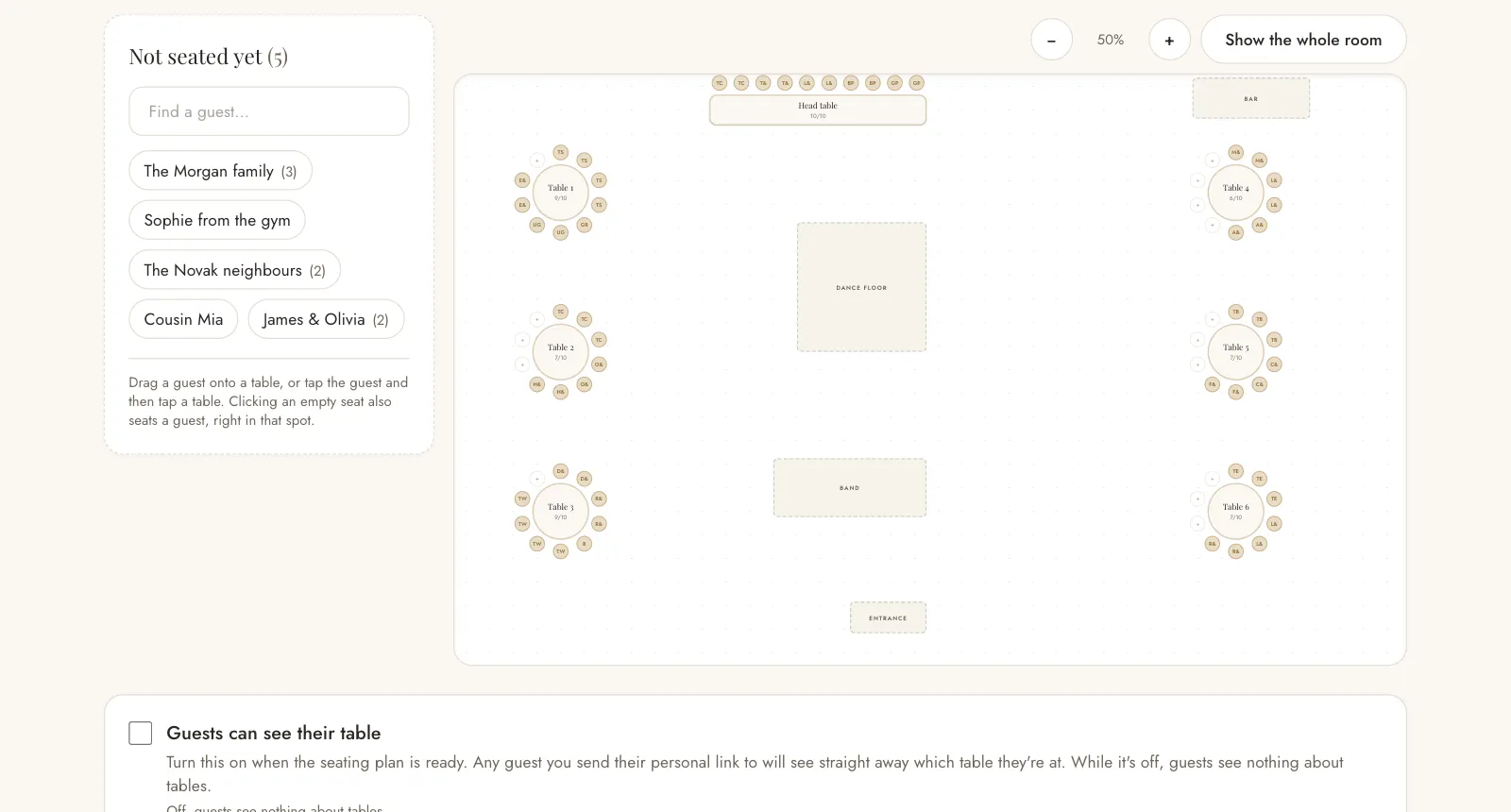
The venue is a canvas on your screen. Add a table, drag it with your finger or mouse to where it really stands in the restaurant, and it stays there. The chairs draw themselves around the table, round or rectangular, and you seat a guest by clicking a chair.
You can also add a stage, a bar, the entrance or a spot for the DJ, so the floor plan looks like a real room and not a spreadsheet.
How many guests fit at a table
Before you draw anything, ask the venue how many tables fit, what shape they are and how many people sit at each. That's the number everything starts from.
A round table usually seats 8 to 10 and is best for conversation, because everyone can see everyone. A rectangular one seats 6 to 8 and is handy in a narrow room or when you put together a long family table. The top table is for the two of you with your best man and maid of honour, and often your parents too. You need to leave a path between tables for waiters and guests, so a venue with 100 seats rarely takes more than 12 tables.
Who sits next to whom
Parents sit close to the couple, but away from the speakers. If they are divorced, give them two equally good tables, apart from each other and about the same distance away. The best man and maid of honour sit with the couple, unless they would rather sit with their own friends.
Children up to eight sit with their parents, older ones are happy with their own table and some colouring books. Put grandparents and guests who find walking harder closer to the exit and further from the music. Seat single guests among couples and familiar faces. Guests always spot the table for everyone who didn't fit anywhere else, so don't make one.
Mix families by age and interests, not by side. Relatives from the same town, friends from university or colleagues from work will get along more easily than two families each sitting by their own wall.
Families don't have to be split up by guesswork
When you seat a family of six at a table with four free seats, the app asks how many of them sit there. The rest go back to the list and you seat them somewhere else. Nobody disappears and nobody gets lost.
If people who aren't from the same family sit at a table, click an empty chair and type the new person's name. They are added to the list straight away as a guest who is coming.
When it's time for the seating plan
About a month before, once the date by which guests should have replied has passed. Before that the list changes every week, so you would end up doing the plan twice. Expect 5 to 15 percent of confirmed guests to cancel, so leave one or two empty seats at each table.
The seating plan works together with your guest list and RSVPs. Whoever confirms they're coming is who you then seat.
Guests see their table on their personal link
When the plan is finished, you switch on the option for guests to see their table. A guest you send their personal link to then sees which table they're at. They don't see other people's names or the whole room, only the name of their own table. Fewer questions for you at the door.
While this is switched off, guests see nothing about the tables. On the shared link for all guests, tables are never shown.
A printout for the restaurant
One click gives you a floor plan of the venue and a list by table. That's what the restaurant asks for, and you don't have to copy anything out. The same list is your template for the welcome board and the place cards.
On your phone and on your computer
You drag tables with your finger, zoom the room with two fingers, and there's a button that brings the whole venue back into view. Still, a computer gives you a better overview when you're starting from scratch.
Seating plan questions
- How do I plan the seating at a wedding?
- Start with the top table and your parents, then seat the families by side, with friends closer to the dance floor. In the app you drag the tables to where they stand in the venue, seat guests with a click and print the plan for the restaurant with one button.
- Is there a free app for a wedding seating plan?
- Yes, this one. It's free and runs in your browser on your phone and computer, with nothing to install. Guests come straight from your guest list, so you never copy anything over.
- How many tables do I need for 100 guests?
- With round tables for 8 to 10 people, you need 10 to 12 tables, plus the top table. Always check the exact number and shape with the venue first. They know how many tables fit with room for the waiters to get through.
- When should I do the seating plan?
- About a month before, once the RSVP deadline has passed. Earlier makes no sense because the list is still changing, and later leaves too little time for the welcome board and place cards.
- Should guests see their table in advance?
- They don't have to, but it helps: fewer questions at the door. In the app you switch this on only when the plan is finished. Guests then see just the name of their own table on their personal link, not anyone else's names.
- Can I change the plan on the day?
- Yes. Drag a table somewhere else or move a guest with a click, then print the plan for the restaurant again. That's why it's worth leaving one or two empty seats at each table.
- Is the seating plan really free?
- Yes. No card, no trial period and no charge per guest. It runs in your browser, with nothing to install.
Everything else is in the planner
The guest list is one part of planning. The IDo wedding planner has 192 pages and takes you from the first ideas to what comes after the wedding. It is written in Croatian.